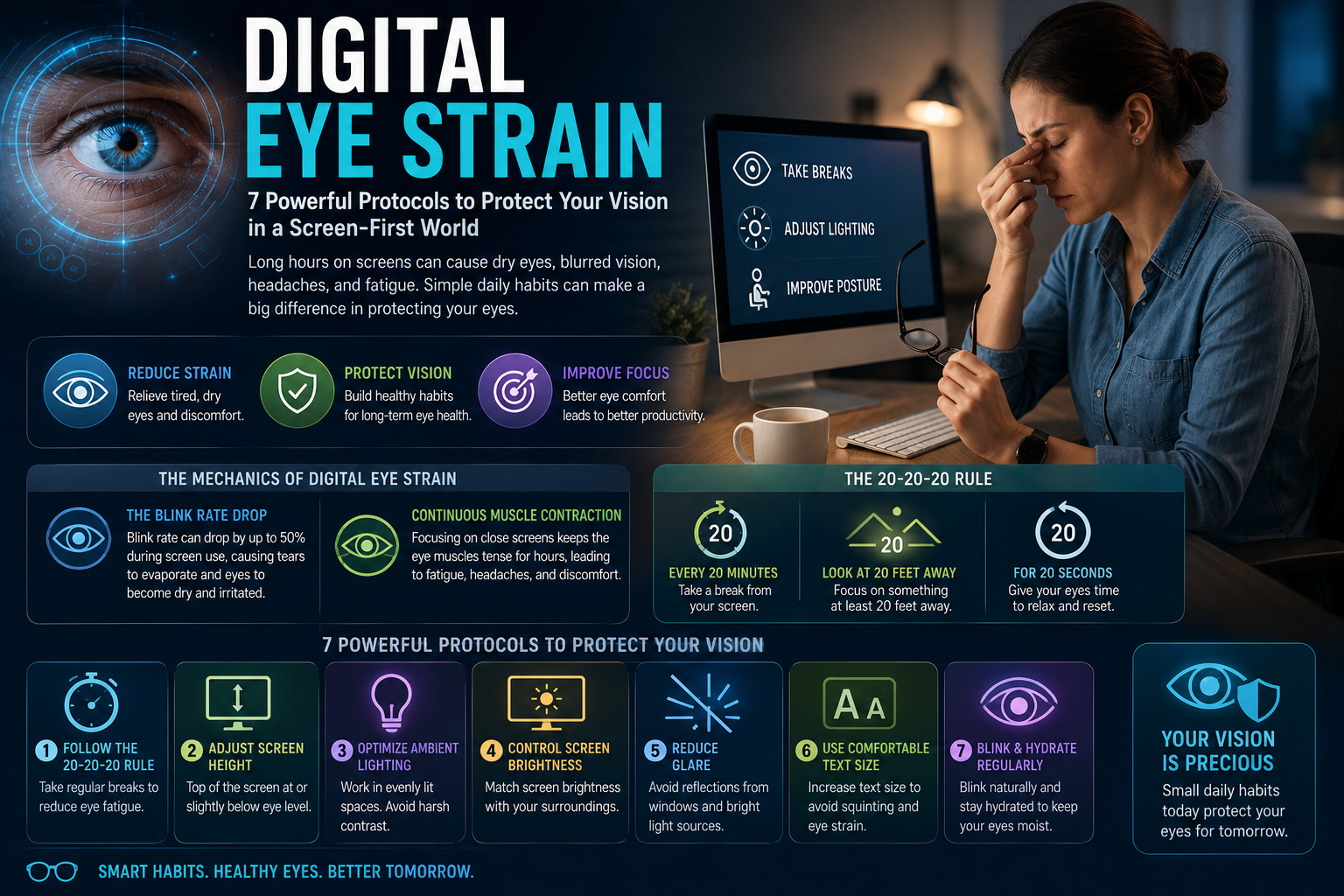
The human eye was designed to interact with a three-dimensional world under changing natural light, constantly shifting focus between nearby objects and distant horizons. Today, however, many people spend long hours looking at computers, smartphones, tablets, and other digital displays. This is where Digital Eye Strain becomes an important modern vision concern. Common symptoms can include dry or irritated eyes, temporary blurred vision, headaches, difficulty focusing, and discomfort around the eyes and neck after prolonged screen use.
As digital devices have become central to work, education, entertainment, and communication, reducing Digital Eye Strain is no longer simply about using a screen less. Small changes in viewing distance, blinking, screen position, lighting, and regular visual breaks can create a more comfortable environment for your eyes.
Digital Eye Strain: 7 Powerful Ways to Protect Your Vision
Digital Eye Strain is often associated with prolonged computer or smartphone use. The condition is also commonly discussed under the broader term Computer Vision Syndrome.
The symptoms can become more noticeable after several hours of continuous screen use. Someone may begin the morning feeling comfortable but develop eye dryness, blurred vision, headaches, or difficulty maintaining focus later in the day.
The good news is that many everyday screen habits can be adjusted.
Instead of waiting until your eyes feel exhausted, a proactive approach can help create healthier screen-use habits throughout the workday.
Digital Eye Strain and the Mechanics of Eye Fatigue
When you concentrate on a digital display, your visual system is performing continuous work. Your eyes must maintain focus, process rapidly changing visual information, and repeatedly adjust to the brightness and contrast of the screen.
At the same time, intense concentration can influence how frequently you blink.
Blinking is important because it spreads the tear film across the surface of the eye. This helps keep the eyes comfortable and supports a stable optical surface.
Digital Eye Strain and Reduced Blinking
People generally blink less frequently when concentrating on screens. The exact reduction can vary depending on the activity, display, environment, and level of concentration.
When blinking becomes less frequent, the tear film may become less stable, which can contribute to dryness, burning, irritation, or a gritty sensation.
This is one reason consciously remembering to blink can be a powerful but simple part of managing Digital Eye Strain.
Rather than staring continuously at the display, allow yourself to blink naturally and completely. Short visual breaks can also help interrupt prolonged concentration.
Digital Eye Strain and Continuous Near Focus
Your eyes use a complex focusing system to see nearby objects clearly.
When you read a message on your phone or work on a computer, your eyes remain focused at a relatively close distance for extended periods. This is very different from regularly looking across a natural landscape where your visual focus changes between different distances.
Long periods of uninterrupted near work may contribute to visual fatigue.
This does not mean that screens permanently damage the focusing muscles in healthy adults. Instead, the immediate issue is often discomfort and temporary fatigue associated with prolonged visual demand.
Taking regular breaks gives your visual system an opportunity to relax.
Digital Eye Strain: The Powerful 20-20-20 Strategy
One of the most widely recommended approaches for reducing screen-related visual discomfort is the 20-20-20 rule.
After approximately 20 minutes of near-screen work, look at something around 20 feet away for about 20 seconds.
The purpose is simple: temporarily shift your visual focus away from the nearby screen.
You do not need a complicated application or expensive device to practice it. A silent reminder on your computer or phone can help you develop the habit.
The most important part is consistency.
Digital Eye Strain and Distance Breaks
The benefit of a distance break is not that it magically “resets” your eyes. Instead, it interrupts continuous near-focus activity.
If you work for several hours without looking away, even a short visual pause can make the work environment feel more comfortable.
For people who spend most of their day in front of a monitor, combining regular distance breaks with good screen positioning can become a practical Digital Eye Strain prevention strategy.
Digital Eye Strain and Screen Height
The position of your monitor can affect both eye comfort and neck posture.
A monitor that is positioned too high may encourage you to look upward for long periods. A monitor that is extremely low may cause excessive neck flexion.
A commonly recommended ergonomic arrangement is to position the top portion of the screen around eye level or slightly below, allowing your gaze to naturally angle somewhat downward.
This can also reduce the amount of the eye’s surface exposed to the surrounding air, which may help with comfort for some people experiencing dryness.
Digital Eye Strain and Viewing Distance
Distance matters as well.
A screen positioned extremely close to your face requires greater near-focus demand. Increasing the viewing distance to a comfortable level can reduce this demand.
For a desktop monitor, a distance of roughly an arm’s length is commonly comfortable for many users, although individual preferences and screen sizes vary.
The text should be large enough that you do not have to lean forward or squint to read it.
Digital Eye Strain and Ambient Lighting
Lighting is another important part of a comfortable workspace.
Working in a completely dark room while staring at a bright monitor creates a strong contrast between the screen and its surroundings. At the same time, excessive overhead lighting or sunlight reflected directly onto the display can create glare.
Both situations can make visual tasks more uncomfortable.
A better approach is to create balanced ambient lighting.
Your workspace should have enough surrounding light to see comfortably without creating strong reflections on the screen.
Digital Eye Strain and Screen Brightness
Your display should not feel dramatically brighter than the surrounding environment.
If the screen feels like a bright lamp in a dark room, reducing its brightness may improve comfort.
On the other hand, lowering the brightness too much can make text difficult to read, causing you to squint or move closer to the screen.
The goal is therefore not simply “lower brightness.”
The goal is comfortable brightness that matches the lighting conditions around you.
Modern monitors and operating systems may also provide brightness adjustment, contrast controls, dark modes, and other display settings that can be personalized according to your environment.
Digital Eye Strain and Glare Reduction
Glare can create unnecessary visual discomfort because your eyes must process both the content on the screen and reflections from surrounding light sources.
Positioning your monitor away from direct windows, adjusting curtains or blinds, and changing the angle of the display can reduce reflections.
A matte screen surface may also help in certain environments.
The best solution depends on the workspace.
Instead of increasing screen brightness to overpower reflections, it is often more effective to reduce the source of the glare itself.
Digital Eye Strain and the Importance of Blinking
Blinking is an automatic behavior, but concentration can interfere with it.
When reading, coding, gaming, editing videos, or watching detailed content, people may stare at the display for long periods.
A simple strategy is to consciously relax your face and allow full, natural blinks.
If your eyes already feel dry, deliberately blinking several times during a break may help spread the tear film across the eye surface.
People with persistent dry-eye symptoms may also need professional advice, particularly if discomfort continues despite improving their screen habits.
Digital Eye Strain: Your Modern Screen Defense Table
| Screen Habit | Potential Problem | Better Strategy |
|---|---|---|
| Long uninterrupted screen sessions | Visual fatigue | Take regular distance breaks |
| Rare blinking | Dryness and irritation | Blink naturally and fully |
| Screen too close | Increased near-focus demand | Maintain a comfortable distance |
| Monitor too high | Neck and visual discomfort | Position screen around eye level or slightly below |
| Bright screen in dark room | High visual contrast | Balance screen and room lighting |
| Strong reflections | Glare | Reposition screen or reduce light sources |
| Tiny text | Squinting and leaning forward | Increase text and display scaling |
| Poor posture | Neck and shoulder tension | Use an ergonomic workstation |
These adjustments work best together. Digital Eye Strain is rarely caused by one single screen setting.
Digital Eye Strain and Text Size
Small text can encourage squinting, leaning forward, and prolonged visual concentration.
If you regularly find yourself moving your face closer to the monitor to read, increasing the font size may be a simple solution.
Modern operating systems and browsers allow users to increase text size and display scaling without physically changing the monitor.
Larger text can make reading more comfortable and reduce the temptation to maintain an unnecessarily close viewing distance.
Digital Eye Strain and Smartphone Use
Smartphones create a unique challenge because they are frequently used at a much closer distance than desktop monitors.
People may hold their phones only a short distance from their faces while reading messages, browsing social media, watching videos, or playing games.
Long periods of close smartphone use can therefore increase visual demand.
Instead of holding the phone extremely close, maintain a comfortable viewing distance and take regular breaks.
Increasing text size can also make reading easier without requiring you to move the device closer.
Digital Eye Strain and the Modern Workday
The modern workday often involves several screens at once.
A laptop may be connected to an external monitor while a smartphone sits nearby. Meetings may require video calls, while documents, spreadsheets, messaging applications, and websites remain open throughout the day.
This creates a continuous visual workload.
A powerful approach is to build visual recovery into the work schedule rather than treating it as an emergency response.
For example, after completing a focused task, look away from the screen before starting the next one.
Small habits repeated throughout the day can be easier to maintain than one long break after hours of uninterrupted work.
Digital Eye Strain and Blue Light
Blue light is frequently blamed for screen-related eye problems, but the situation is more complicated.
Digital displays emit blue light, and exposure to light in the evening can influence the body’s circadian system. However, the primary causes of daytime screen-related eye discomfort are generally more closely associated with prolonged near work, reduced blinking, glare, viewing conditions, and sustained visual attention.
This means that simply purchasing blue-light-blocking glasses is not necessarily the most important solution for Digital Eye Strain.
Good screen habits, appropriate lighting, comfortable viewing distance, and regular breaks should remain the foundation of a screen-comfort strategy.
Digital Eye Strain and Sleep-Friendly Screens
Although blue-light exposure is not the only factor involved in screen discomfort, nighttime screen use has another consideration: sleep.
Bright screens late at night can contribute to increased alertness and may interfere with the body’s normal nighttime light signals.
Reducing screen exposure before bedtime, lowering brightness, and using warmer display settings may be useful for people who find screens disruptive at night.
This is slightly different from Digital Eye Strain, but both issues can be addressed through thoughtful screen habits.
Digital Eye Strain: A Simple Visual Recovery Graph
The following conceptual graph shows how visual discomfort may increase during uninterrupted screen work and how short breaks can interrupt that pattern:
Visual Discomfort
High |                         ████
     |                    █████
     |               █████
     |          █████
     |     █████
Low  |____██____██____██____██____
          Break   Break   Break
        20 min  20 min  20 min

        Continuous screen work → Visual fatigue
        Short distance breaks → Recovery opportunity
This is a conceptual illustration rather than a clinical measurement. Individual responses vary depending on screen time, lighting, vision, environment, and existing eye conditions.
Digital Eye Strain and Workspace Ergonomics
Eye comfort does not exist separately from the rest of your body.
A poorly positioned monitor can encourage you to lean forward. A laptop placed too low may contribute to neck and shoulder tension. A screen positioned too far away may encourage squinting.
Therefore, reducing Digital Eye Strain should involve your entire workstation.
Your chair, desk, monitor, keyboard, lighting, and screen distance should work together.
A comfortable workstation makes it easier to maintain good posture and avoid unnecessary physical tension during long periods of screen use.
Digital Eye Strain: 7 Powerful Screen Habits
The most effective strategy is not to completely avoid technology. Digital devices are essential for modern work, education, communication, and entertainment.
Instead, create healthier interactions with them.
Use regular distance breaks, maintain a comfortable viewing distance, adjust screen height, reduce glare, balance ambient lighting, increase text size when necessary, and remember to blink naturally.
These habits are simple, but their value comes from repeating them consistently.
When Digital Eye Strain Needs Professional Attention
Most temporary screen-related discomfort improves when the visual environment and screen habits are adjusted.
However, persistent symptoms should not automatically be blamed on your computer.
If you experience ongoing blurred vision, significant eye pain, persistent headaches, double vision, unusual light sensitivity, or other concerning changes, an eye-care professional can help identify the underlying cause.
An eye examination may also be useful if you have not had your vision checked recently. An uncorrected prescription can make prolonged screen work more difficult and may contribute to discomfort.
Digital Eye Strain in a Screen-First Future
Screens are unlikely to disappear from everyday life.
Remote work, online education, artificial intelligence, digital entertainment, virtual meetings, smartphones, and wearable technology are all increasing the amount of visual information people process.
That makes Digital Eye Strain an increasingly relevant modern wellness topic.
The solution is unlikely to be avoiding technology completely.
Instead, the future of healthy screen use will depend on creating better habits and better environments around technology.
Displays may become sharper, brighter, and more intelligent, but our eyes will still need regular changes in focus, comfortable lighting, blinking, and periods away from the screen.
Conclusion: Digital Eye Strain and Modern Vision Protection
Digital Eye Strain is a common concern in a world where computers, smartphones, tablets, and other displays have become part of everyday life. Prolonged near-focus work, reduced blinking, glare, poor lighting, uncomfortable viewing distances, and inadequate breaks can all contribute to visual discomfort.
The good news is that many of these factors can be addressed through simple environmental and behavioral changes.
The 7 powerful principles of better screen habits are straightforward: take regular distance breaks, maintain a comfortable viewing distance, position your monitor appropriately, balance ambient lighting, reduce glare, use readable text sizes, and give your eyes opportunities to blink and relax.
You do not need to abandon technology to protect your visual comfort. You need to build a smarter relationship with it.
Digital Eye Strain: 7 Powerful Protocols to Protect Your Vision in a Screen-First World is ultimately about making screen use more sustainable. By combining practical ergonomics with regular visual recovery, you can create a more comfortable digital environment while continuing to benefit from the technology that has become central to modern life.